 K1 / K1m / K1r Patch Reader Release Notes

All images, text, JavaScript and HTML Code ©1995- by llamamusic.com
This web browser utility reads Kawai K1 / K1m / K1r All Patch Bulk Dump (96 Patches) ‑or‑ Single Patch Dump *.SYX files. It will read *.SYX files from a computer, tablet or smartphone and display 32 MULTI Patch names and 64 SINGLE Patch names for a Bulk Dump file ‑or‑ only one Patch name for a Single Dump file. This can be useful for identifying specific Patch sets to help organize your Kawai Patch library. The cool thing is that you don't need to install any software. It's all done using Firefox, Safari, Chrome or whichever web browser you prefer to use. It's a new approach. Any O/S on any computer can run this utility
Version 1.0(βετΔ) - 08/12/2026
      • Initial Release
Version 1.1 - 08/14/2026
      • Minor Display Formatting
Version 1.2 - 08/15/2026
      • Added The Ability To Read Single Patch *.SYX Files And Display A Solitary Patch Name
      • Display how the SysEx File Was Saved
         ‣ What Type Of SysEx Dump Was It?
            ★ All Single Data Dump (96 Patches)
            ★ All Multi Data Dump (96 Patches)
            ★ One Single Data Dump (A Solitary Patch)
            ★ One Multi Data Dump (A Solitary Patch)
         ‣ Was The *.SYX An Internal Patch Or An External Patch File?
         ‣ Was The *.SYX A Multi Patch Or A Single Patch File?
         ‣ What MIDI Channel# Was Used? (This Is Useful Info When Transferring The *.SYX File Back To The Synth)
Extras
- 1) There are several Patch sets available online to download for free. Here are a few weblinks to get you started
 The "SynthMania" Kawai K1 Patch page
The "Kawai K1 Synthesizer Fans" Facebook page in the FILES section
- 2) This utility should work with Bulk Dump *.SYX files created on Kawai synths using older firmware v1.3 or greater. If you experience any issues, it is recommended to have the latest EPROM firmware installed in your keyboard/module
To check the current firmware version for the K1 / K1m / K1r
- Power OFF the keyboard/module
- Press and hold the SYSTEM button on the front panel
- Power ON while continuing to hold the SYSTEM button
- The LCD will display the current firmware version
If you are proficient at burning your own EPROMs, current firmware for these models can be found here
K1 Firmware v1.5: llamamusic.com
K1m Firmware v1.5: dbwbp.com
K1r Firmware v1.4: llamamusic.com
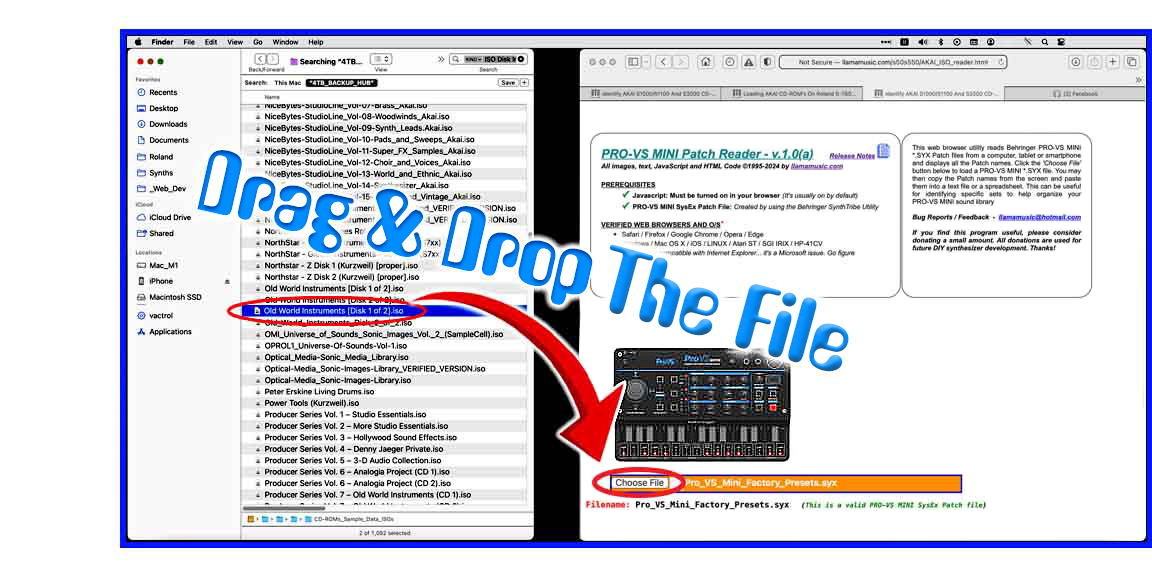
- 3) When using this utility on a Mac system, to speed up the load process, open a Finder window and search for all *.SYX files. Drag one file at a time from the Finder window directly onto the "Choose File (SafaDon't getri/Chrome)" or "Browse (FireFox)" button in this browser utility. The file will then be read automatically without having to drill down and search through several directories (click for larger image)
Questions & Answers
Q: Is there any way to run this utility offline without being connected to the Internet?
A: Absolutely! Right‑click on the weblinks Kawai_K1_reader.html & Kawai_K1_Release_Notes.html then use the "Download Linked File As..." option within your browser and save these two files to a folder on your hard drive. Everything will work exactly the same. To make it look identical with all the original images, right‑click and use the "Save Image As..." option and save these tem image files in the same folder as the HTML files:
1) No software to install
2) It's easier to distribute this way as a simple webpage
3) The most current version will always be available online
Q: Can you add a feature which allows the ability to edit and write Patch names and other parameters?
A: No way, José! Apple, Mozilla and Google go out of their way to make sure that browsers can't write data directly onto the hard drive because of hackers. The only way to write to the hard drive would be to make a stand‑alone program which doesn't use a browser. I don't code anything other than HTML so... no future plans are in store for a stand‑alone program
A: Absolutely! Right‑click on the weblinks Kawai_K1_reader.html & Kawai_K1_Release_Notes.html then use the "Download Linked File As..." option within your browser and save these two files to a folder on your hard drive. Everything will work exactly the same. To make it look identical with all the original images, right‑click and use the "Save Image As..." option and save these tem image files in the same folder as the HTML files:
         PRG_icon.jpg            yellow.gif             kawai_k1_small.jpg
         text_icon.jpg           Kawai_logo.jpg         paypal_donate_smaller.jpg
         computer_bug.gif        Drag_and_Drop.jpg      llamamusic_QR_Code_PayPal.jpg
         50home_inverse.jpg
I designed this as an online utility for three reasons:
1) No software to install
2) It's easier to distribute this way as a simple webpage
3) The most current version will always be available online
Q: Can you add a feature which allows the ability to edit and write Patch names and other parameters?
A: No way, José! Apple, Mozilla and Google go out of their way to make sure that browsers can't write data directly onto the hard drive because of hackers. The only way to write to the hard drive would be to make a stand‑alone program which doesn't use a browser. I don't code anything other than HTML so... no future plans are in store for a stand‑alone program
If you find some of this DIY info useful, please consider donating a small amount. All donations are used for future DIY sampler development and free info. Thanks!

|

|
Comments/Questions?
llamamusic@hotmail.com
(If you want to report a bug or have a feature added, let me know)
llamamusic@hotmail.com
(If you want to report a bug or have a feature added, let me know)