
All images, text, JavaScript and HTML Code ©1995- by llamamusic.com
Version 1.0 - 01/12/2023
     • Initial Release

(Figure 1)
1) Press the MIDI button then press the PARAM △ Up Arrow and ensure these settings are turned ON
       TX C.M.  APR = ON
       TX PATCH APR = ON
       TX TONE  APR = ON
Press the PATCH A←→B button then press the PARAM △ Up Arrow and ensure this setting is ON
MIDI EXCL = ON
2) Open a generic SysEx program such as Snoize (Mac) or SendSX (Windows)
3) Set the SysEx program on the computer to capture data from the synth
❖ Ensure the capture buffer is empty
4) Press the PATCH A←→B button and choose a Patch on the MKS‑50 you want to save on the computer
❖ i.e. To call up P-A83 TwiliteZne, press 8 then press 3
NOTE: It is important to press only two number buttons when sending Patch data from the MKS-50
(Pressing more than two number buttons will send too much SysEx data)
5) Save the captured SysEx data to your computer and use the *.SYX extender
Notes
1) This utility will only work with Tones created using the Roland MKS‑50 synthesizer
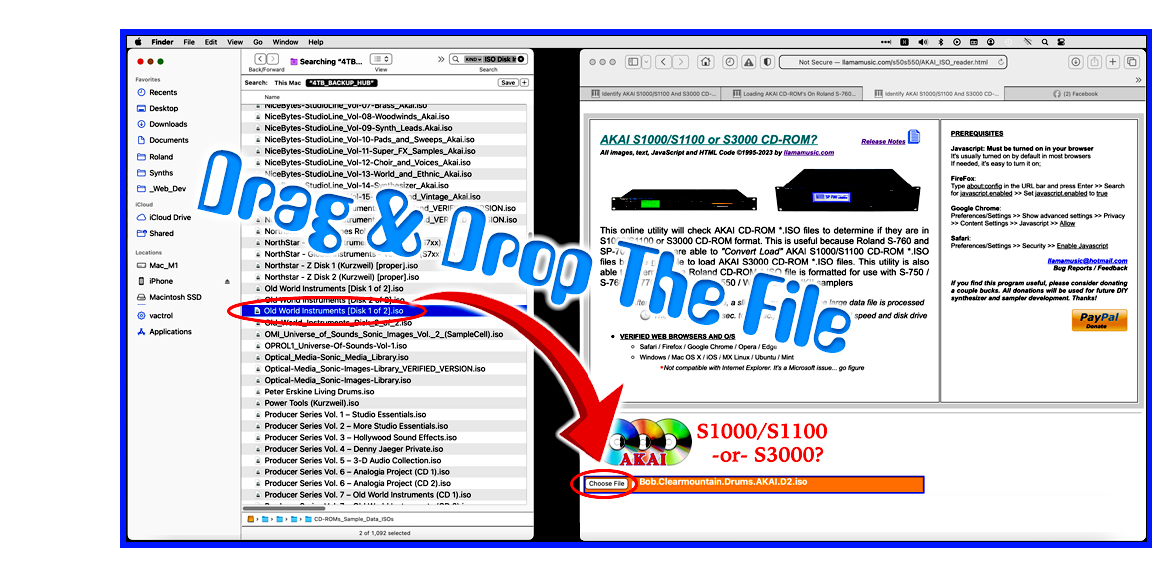
2) When using this utility on a Mac system, to speed up the load process, open a Finder window and search for *.SYX files. Drag one file at a time from the Finder window directly onto the "Choose File (Safari/Chrome)" or "Browse (FireFox)" button in the browser utility. The file will then be read automatically without having to drill down and search through several directories (click for larger image)
3) This utility works with any web browser* and reads MKS‑50 All Parameters (APR) Patch *.SYX files from a computer hard drive. It will display all of the parameters for a single Patch within your web browser. After loading a valid APR *.SYX file from the synth, you may then copy, print or save the parameters shown on the web browser screen and easily share your new Patch creations with other synth owners
When using the Safari and FireFox web browsers, I find it easiest to save the web page as a PDF file
       Safari: Dropdown Menu  >>  File  >>  Export as PDF  >>  Save
      Firefox: Dropdown Menu  >>  File  >>  Print  >>  Destination  >>  Save to PDF  >>  Save
A sample PDF printout can be viewed at this link
* This utility is not compatible with Internet Explorer
4) The MKS‑50 has a different SysEx structure than the the Alpha Juno and HS synths which is why it has it's own version. A version for the Alpha Juno and HS synths is available at this link
5) For the "Techno Geek" crowd, the first seven bytes of SysEx data is what sets an MKS‑50 APR Patch file apart from Alpha Juno, JX‑10, DX‑7 and all other *.SYX files. Section 3.1.2 on Page 62 of the MKS‑50 Owner's Manual explains in detail what data is sent by the synth when the "All Patch Parameters With Patch Names" command is issued when a two‑digit number is pressed on the front panel. Blue values contain Patch data which is sent when TX PATCH APR = ON. Red values contain user defined Chord data when TX PATCH C.M. = ON. Green values contain Tone data when TX PATCH TONE = ON. Bold text indicates the actual Patch, Chord and Tone parameter values. The underlined sections contain values for the Patch name and Tone name which in this case happen to be the same... TwiliteZne
❖ The APR SysEx file will be ~4KB and a typical Patch data stream looks like this
F0 41 35 00 23 30 01 3A 0C 6D 14 00 20 00 7F 00 00 0C 00 00 13 30 22 25 22 2D 1E 19 27 1E F7 F0 41 35 00 23 40 01 3C 7F 7F
7F 7F 7F F7 F0 41 35 00 23 20 01 00 00 02 01 00 00 02 00 00 01 01 00 00 28 00 00 25 7F 10 1E 70 00 60 28 7F 00 65 7F 00 7F
34 6E 65 08 61 02 13 30 22 25 22 2D 1E 19 27 1E F7
Individual MKS‑50 APR SysEx files can also be shared with other MKS‑50 synth owners. However, it's not practical to load several APR SysEx files at a time because it's such a time consuming process to load the file, press TONE a←→b, press WRITE to save the Tone, press PATCH A←→B, press WRITE to save the Patch and on and on and on. A synopsis of why this is impractical can be found at this link
A collection of MKS‑50 Patches in APR SysEx format (for testing purposes) is available to download at this link
Re: Tone And Patch Names
So how the fuck do you figure out what a Tone or Patch name is from all the garbage characters in a SysEx data string? Well, Roland is pretty sick (in a bad way) when it comes to coding data for their synths. Most of the time they don't follow any coding conventions and just do what they please. For the example above, TwiliteZne is used as the Tone and Patch name and its SysEx string is:
13 30 22 25 22 2D 1E 19 27 1E
13 30 22 25 22 2D 1E 19 27 1E
T  w  i  l  i  t  e  Z  n  e
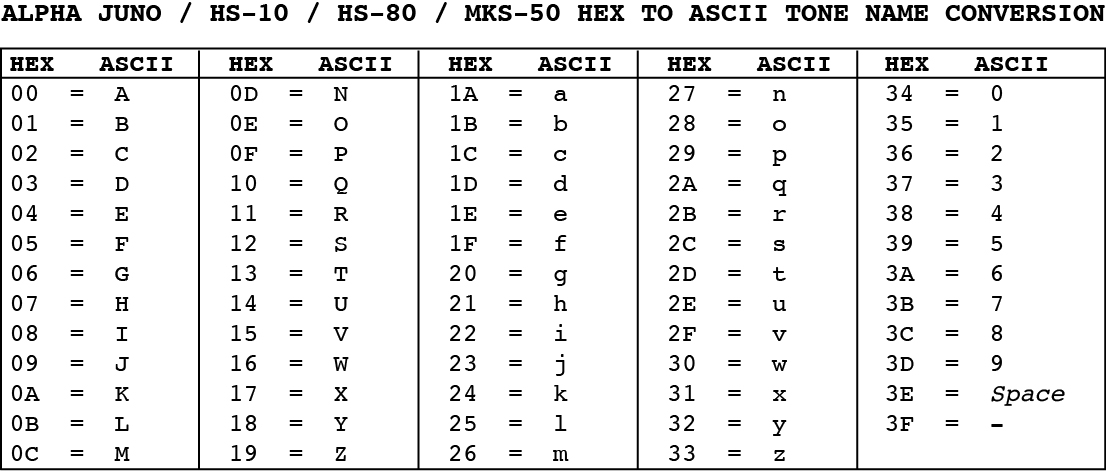
6) There is also a separate utility which is able to read MKS‑50, Alpha Juno‑1, Alpha Juno‑2, HS‑10 or HS‑80 Bulk Dump *.SYX files from a computer hard drive and display all parameters for a single Tone/Patch within a web browser at this link
Questions & Answers
Q: What is an MKS‑50 APR Patch SysEx file?
A: APR stands for "All Parameters" and unlike a Bulk Data SysEx file which contains 64 Patches and 64 Tones, this type of MKS‑50 SysEx file contains less info... a stream of parameters for Patch, Tone and Chord data of only one Patch and one Tone. This stream of data includes settings such as the Chorus Rate, VCF Resonance, Envelope, Portamento Time, Waveforms, User Defined Chord Data and more than fifty other parameter values
Q: Is there any way to run this utility offline without being connected to the Internet?
A: Yes! It's easy. Right‑click on the weblink MKS-50_APR_Patch_Reader.html & MKS-50_APR_Patch_Reader_Release_Notes.html, use the "Download Linked File As..." option within your browser and save these two files to a folder on your hard drive. Everything will work exactly the same. To make it look identical with all of the envelope settings, place the following images in the same folder as the HTML file (all these images have been placed in a *.ZIP file and may be downloaded here)
1) No software to install
2) It's easier to distribute this way as a simple webpage
3) The most current version will always available online
Q: Can you add a feature which allows the ability to edit and write the Patch parameters and Patch name?
A: No way, José! Apple, Mozilla and Google go out of their way to make sure that browsers can't write data directly onto the hard drive because of hackers. The only way to write data on the hard drive would be to make a stand‑alone program which doesn't use a browser. I don't code anything other than HTML so no plans for a stand‑alone program are in the works
A: APR stands for "All Parameters" and unlike a Bulk Data SysEx file which contains 64 Patches and 64 Tones, this type of MKS‑50 SysEx file contains less info... a stream of parameters for Patch, Tone and Chord data of only one Patch and one Tone. This stream of data includes settings such as the Chorus Rate, VCF Resonance, Envelope, Portamento Time, Waveforms, User Defined Chord Data and more than fifty other parameter values
Q: Is there any way to run this utility offline without being connected to the Internet?
A: Yes! It's easy. Right‑click on the weblink MKS-50_APR_Patch_Reader.html & MKS-50_APR_Patch_Reader_Release_Notes.html, use the "Download Linked File As..." option within your browser and save these two files to a folder on your hard drive. Everything will work exactly the same. To make it look identical with all of the envelope settings, place the following images in the same folder as the HTML file (all these images have been placed in a *.ZIP file and may be downloaded here)
    dynamics_gate.jpg           gate.jpg             saw_01.jpg       sub_01.jpg       text_icon.jpg
    envelope_dynamics.jpg       pulse_01.jpg         saw_02.jpg       sub_02.jpg       PRG_icon.jpg
    inverted_dynamics.jpg       pulse_02.jpg         saw_03.jpg       sub_03.jpg       Drag_and_Drop.jpg
    envelope_inverted.jpg       pulse_03.jpg         saw_04.jpg       sub_04.jpg       paypal_donate_smaller.jpg
    50utizone_inverse.jpg       computer_bug.gif     saw_05.jpg       sub_05.jpg       llamamusic_QR_Code_PayPal.jpg
    MKS-50_APR_settings.jpg     MKS_no_split.jpg     dynamics.jpg     envelope.jpg     tone_name_ASCII_conversion.jpg
I designed this as an online utility for three reasons:
1) No software to install
2) It's easier to distribute this way as a simple webpage
3) The most current version will always available online
Q: Can you add a feature which allows the ability to edit and write the Patch parameters and Patch name?
A: No way, José! Apple, Mozilla and Google go out of their way to make sure that browsers can't write data directly onto the hard drive because of hackers. The only way to write data on the hard drive would be to make a stand‑alone program which doesn't use a browser. I don't code anything other than HTML so no plans for a stand‑alone program are in the works
All images, text, JavaScript and HTML Code ©1995- by llamamusic.com
If you find some of this DIY info useful, please consider donating a small amount. All donations are used for future DIY sampler development and free info. Thanks!

|

|

llamamusic@hotmail.com
Comments/Questions?
(If you want to report a bug or have a feature added, let me know)
Comments/Questions?
(If you want to report a bug or have a feature added, let me know)
